
Profile & Billing
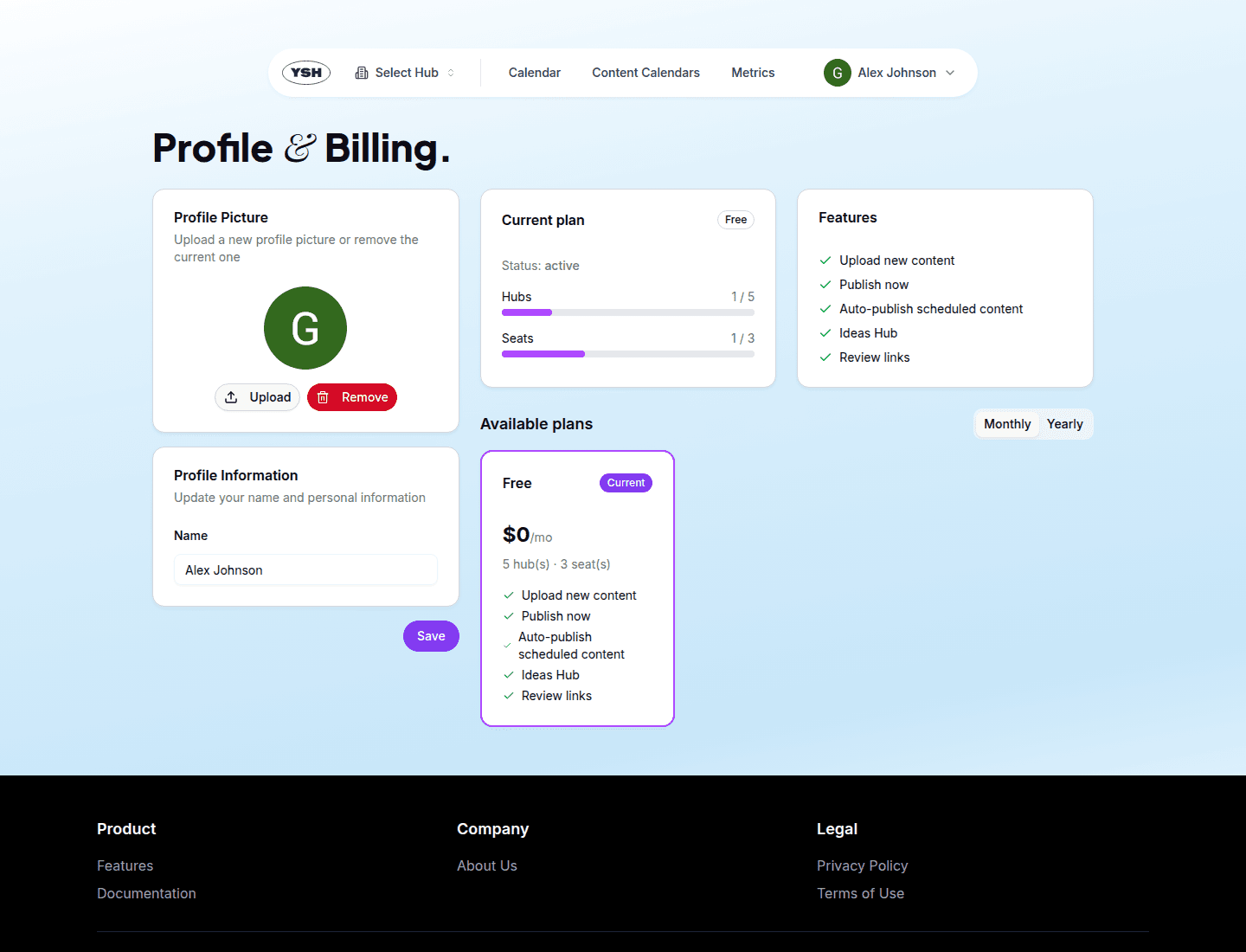
Manage your profile name and photo, and handle your subscription — plans, billing period, add-ons, and cancellation — from one page.
Your Profile
Open Profile & Billing from the user menu (your avatar in the top-right corner). The profile section lets you:
- Edit your display name in the Profile Information card.
- Upload or change your profile photo.
YSH sign-in is passwordless (Google, Facebook, or magic link), so there is no password to manage.
Billing
The billing section on the same page shows your current plan and everything needed to manage the subscription:
- Available plans — compare plans and their limits, with a monthly / yearly billing toggle. Click Subscribe (from the free plan) or Switch to this plan (between paid plans). Payments are processed by Stripe Checkout.
- Add-ons — paid plans that support add-ons let you raise individual limits (for example, extra seats) without switching plans.
- Cancel / resume — a cancelled subscription stays active until the end of the paid period and can be resumed before it expires.
If a payment fails, a warning banner appears across the app with a link to update your payment method.
Plan limits gate certain features — for example, the number of hubs, team seats, or review links. When you hit a limit, the corresponding button leads to this billing page.